
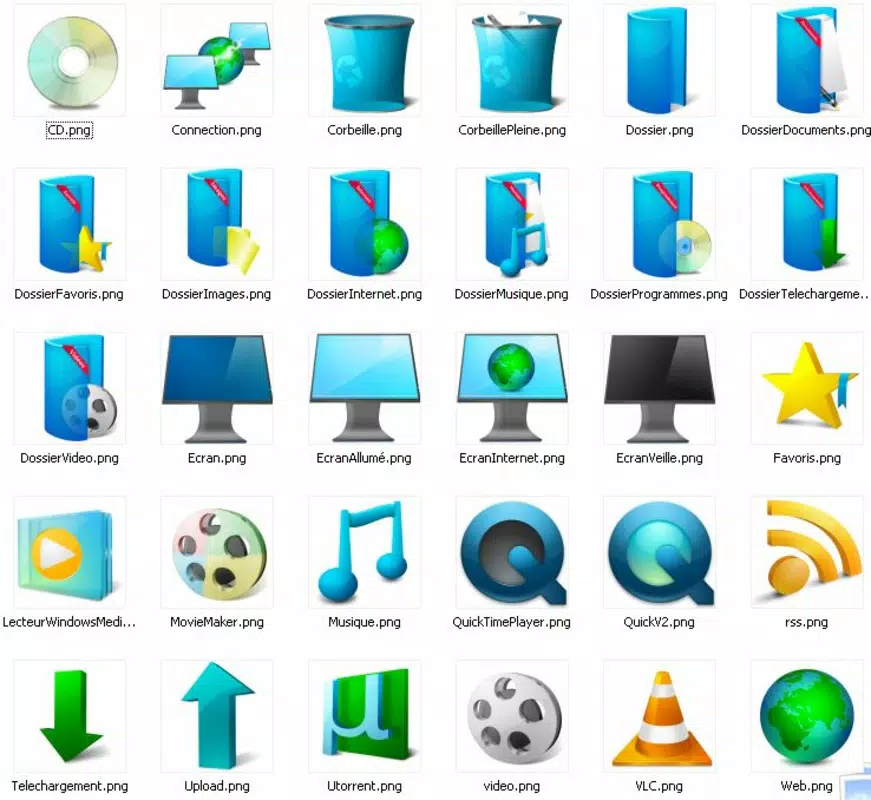

Download Summer Pack – summer icons, desktop customization, Android theme, icon pack, summer aesthetic
Overview
The Summer Pack is a personalized desktop enhancement tool designed for Android users seeking to refresh their device’s visual identity with a vibrant seasonal theme. Tailored for individuals who appreciate creative expression through their smartphone interface, this app offers a curated collection of icon designs that evoke the energy and joy of summer. By transforming standard app icons into bright, cheerful representations, the Summer Pack enables users to align their digital environment with the mood of the season. It serves as a lightweight utility for those who value aesthetic customization without compromising functionality.
Target users include Android enthusiasts, digital creatives, and casual users who enjoy seasonal updates to their device’s appearance. The app is particularly suited for individuals who find inspiration in visual themes and want to infuse their daily tech experience with a sense of renewal. Although the developer, Thomas P. Larson, is credited with the creation, no additional background or company affiliation was provided. The pack’s purpose is strictly aesthetic—enhancing visual appeal through thematic icon design—making it a non-essential but enjoyable addition to the Android personalization ecosystem.
Real-world use cases include seasonal device updates, such as transitioning to a summer-themed interface during warmer months, or using the pack as a mood booster during long workdays. Its simple, focused design ensures it integrates smoothly into daily routines without requiring technical expertise. The Summer Pack fills a niche in the Android app market by offering a dedicated, theme-specific solution for users who prioritize visual harmony and seasonal engagement in their digital spaces.
Key Features & Functionality
- Vivid Summer Icons: The pack includes 30 uniquely crafted icons in PNG format with a 512x512 pixel resolution. Each icon features bright, warm hues and playful design elements such as sun rays, tropical patterns, and oceanic reflections, contributing to a cohesive summer aesthetic.
- Comprehensive App Coverage: Icons are designed for widely used applications such as uTorrent, VLC, and QuickTime, ensuring that essential tools maintain visual consistency within the summer theme. This broad compatibility enhances usability across diverse user needs.
- 3D Touch Effects: Each icon incorporates subtle 3D visual effects, including depth shading and reflection layers, which create a dynamic, lifelike appearance when viewed on the home screen. These effects add a tactile dimension to the digital interface.
- Easy Customization: The installation process is streamlined—users simply download the pack and apply it through a compatible launcher. No complex setup or technical configuration is required, making it accessible to users of all experience levels.
- Seasonal Inspiration: Beyond visual appeal, the pack aims to foster a positive emotional connection to the season. Its cheerful design encourages users to embrace the energy and optimism associated with summer, turning routine device usage into a more enjoyable experience.
For example, a user might apply the pack during a beach vacation to align their device’s look with their physical environment. Similarly, someone working remotely could use it to create a more uplifting workspace during the summer months. The pack’s focus on consistency and visual cohesion ensures that the transformation feels intentional and immersive.
Interface, UX & Performance
The Summer Pack does not include a standalone interface, as it functions as a theme resource rather than a full application. Instead, its usability depends on the user’s device launcher, which must support third-party icon packs. The design philosophy emphasizes minimalism and clarity, with icons arranged in a clean, grid-based layout that aligns with standard Android home screen conventions.
Navigating the pack is straightforward—users typically access it through a launcher’s theme or icon customization menu. The visual style is consistent across all icons, with no abrupt shifts in color or scale. Responsiveness is expected to be high, given the app’s lightweight nature and static image format. Although the developer did not list formal performance metrics, the 12.5 MB file size suggests efficient resource usage, minimizing impact on device storage and battery.
Stability is likely maintained due to the use of standard PNG files, which are universally supported across Android systems. No reported issues with crashes or loading delays were mentioned. The pack is designed to be applied and removed without affecting system performance, ensuring a smooth user experience. Users with older Android devices should find it compatible, though specific hardware requirements were not disclosed.
Platform Compatibility & Technical Requirements
The Summer Pack is available exclusively on the Android platform. It is compatible with Android devices running a version that supports third-party icon packs, though the exact minimum OS version was not specified by the developer. The app is designed for mobile devices and does not support tablets or other form factors unless explicitly stated.
With a file size of 12.5 MB, the pack is compact and suitable for devices with limited storage capacity. The software version is 1.0.0, indicating a stable initial release. No additional system requirements or hardware specifications were provided. Users should ensure their device’s launcher supports external icon packs to fully utilize the content. Compatibility with specific launchers (e.g., Nova, Microsoft Launcher) may vary based on individual implementation.
Pros and Cons
- Lightweight and fast to install (12.5 MB)
- High-resolution icons (512x512 pixels) for crisp display
- Includes icons for popular apps like VLC and uTorrent
- Features 3D touch effects for enhanced visual depth
- Free to download and use
- Requires a compatible launcher to apply changes
- No official update history or changelog provided
- Specific OS version requirements not disclosed
- Only available for Android, not iOS or other platforms
- Does not include animated or interactive elements
FAQ
Is the Summer Pack free to use?
Yes, the Summer Pack is available at no cost. There are no in-app purchases or subscription fees.
Can I use this icon pack on iOS devices?
No, the app is currently only available for Android. There is no iOS version or support announced.
Do I need a special launcher to apply the icon pack?
Yes, the Summer Pack requires a launcher that supports third-party icon packs. Most popular Android launchers, such as Nova or Microsoft Launcher, are compatible.
How do I install the Summer Pack?
Download the pack from a trusted source, then open it through your device’s launcher settings. Select the icon pack and apply it to your home screen.
Is the app safe to download and install?
Yes, the app is distributed as a standard APK file and does not contain malware. However, users should always download from reputable sources to ensure security.
Final Thoughts
The Summer Pack offers a simple yet effective way to refresh your Android device’s appearance with a cheerful, seasonally inspired theme. Its focus on visual consistency, high-quality icons, and ease of use makes it a valuable tool for users who enjoy personalizing their digital environment. While it lacks advanced features or dynamic content, its strengths lie in its aesthetic coherence and accessibility.
It is ideal for Android users who appreciate seasonal updates, creative expression, and a touch of fun in their daily tech routine. Whether you're preparing for summer travel or simply want to brighten your workspace, this pack delivers immediate visual impact with minimal effort.
Download Summer Pack now


